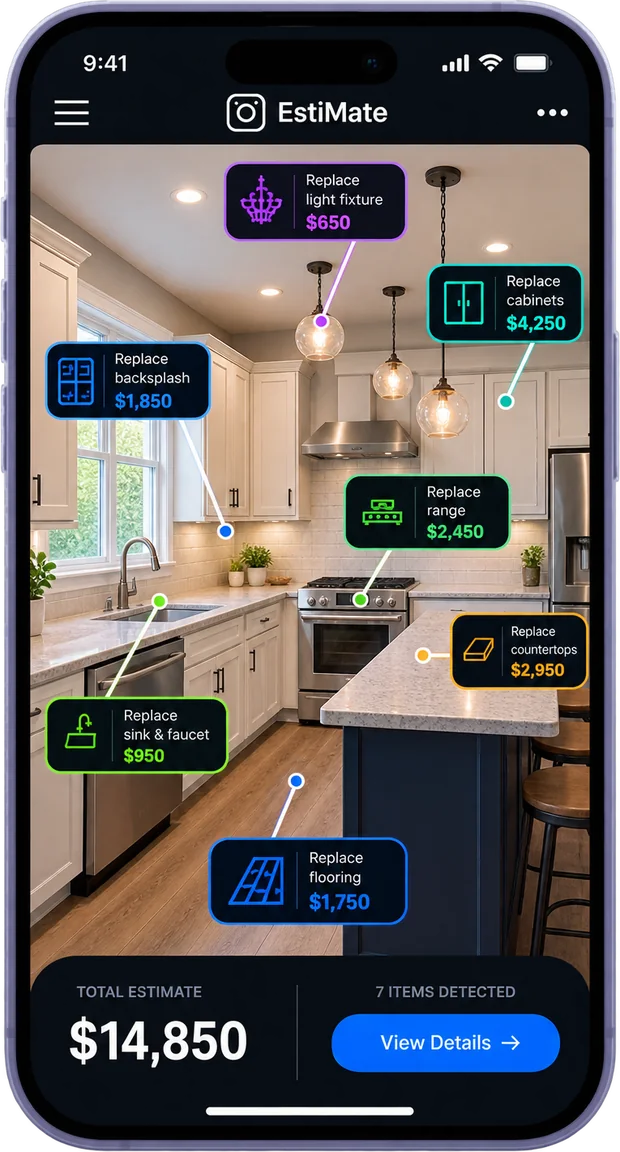
EstiMate on a phone: a kitchen with every repair tagged and priced

Point. Snap. Priced.

EstiMate turns your walkthrough photos into the complete deal analysis: repairs, comps, ARV & MAO, before you leave.

In the field orComfortablycomfortably at the desk, every repair priced.

Free for a week. The clock starts on your first property.
Or book a call and we will walk one with you.
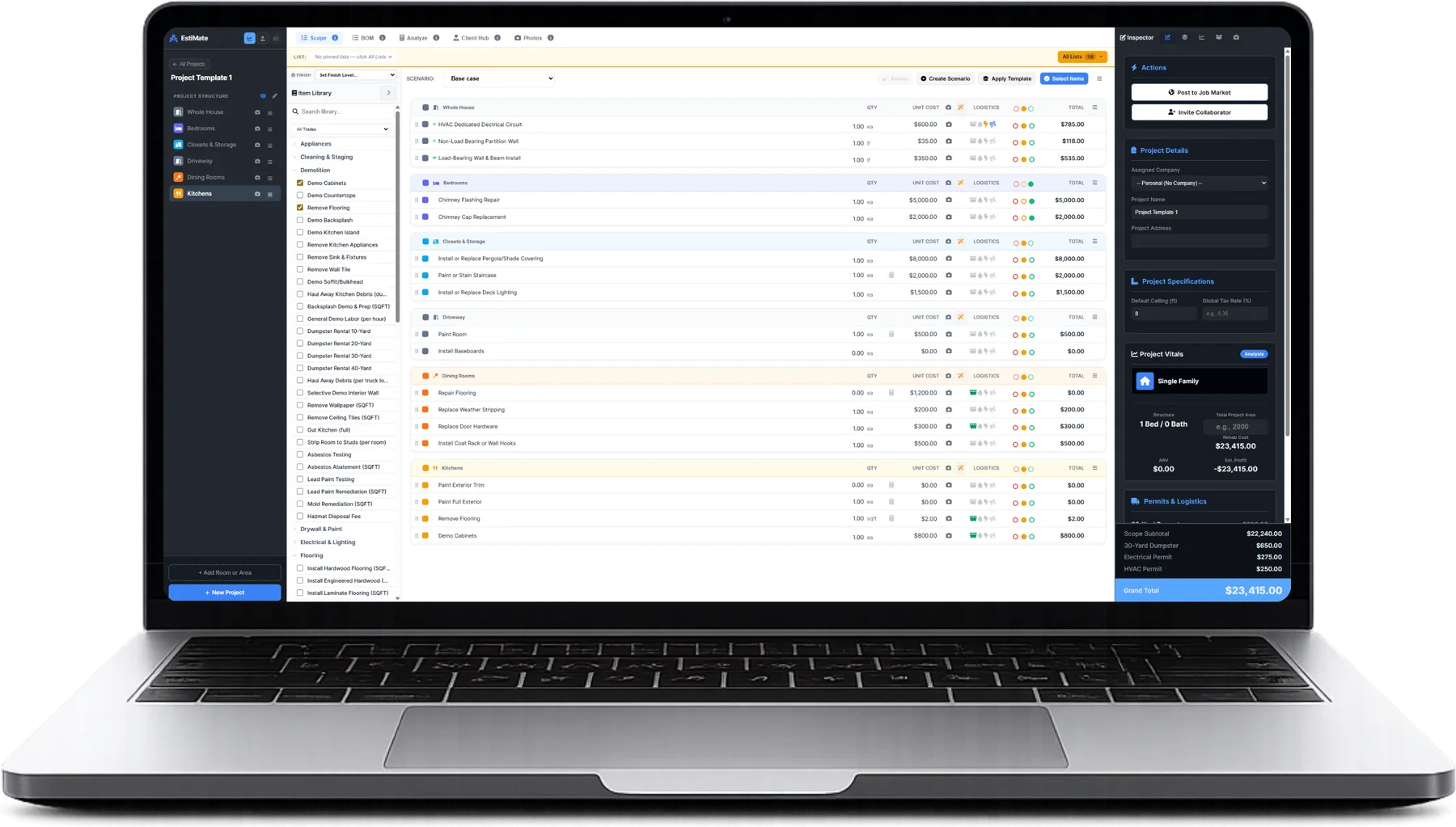
EstiMate on a laptop: the full estimate, every line priced
15 minWalkthrough to sent offer
3Price levels on every line
~1,000Items priced and ready
1 weekFree, from your first property
Photo to scope

Photograph the room.
Get the scope.

Point the camera at a room and it names the work it can see — cabinets, counters, subfloor, drywall, cans, paint — and puts a quantity and a cost on every line, at your rates.

Full AI scope generation from walkthrough photosLine items, quantities, and pricing built automatically as you move room to room. No checklist. No manual entry unless you want it.
Your maximum offer recalculates as the scope buildsAfter-repair value, repair cost, holding costs and the most you can pay (MAO) update in real time. You know your number before you leave the driveway.
Auto-logistics — dumpsters, permits, consumablesEvery cost that gets forgotten gets added automatically. The number you leave with is the number that holds up when the real bids come in.
True offline — works with zero signalBasements, rural properties, concrete structures. The full product works without a connection. Syncs automatically when you reconnect.
Generate and send every output from your phonePDF report, Bill of Materials, live shareable URL, contractor broadcast — all available on mobile. The deal closes from the driveway if you want it to.
A kitchen photographed, every repair tagged and priced
At the desk

Or sit down and take it apart.

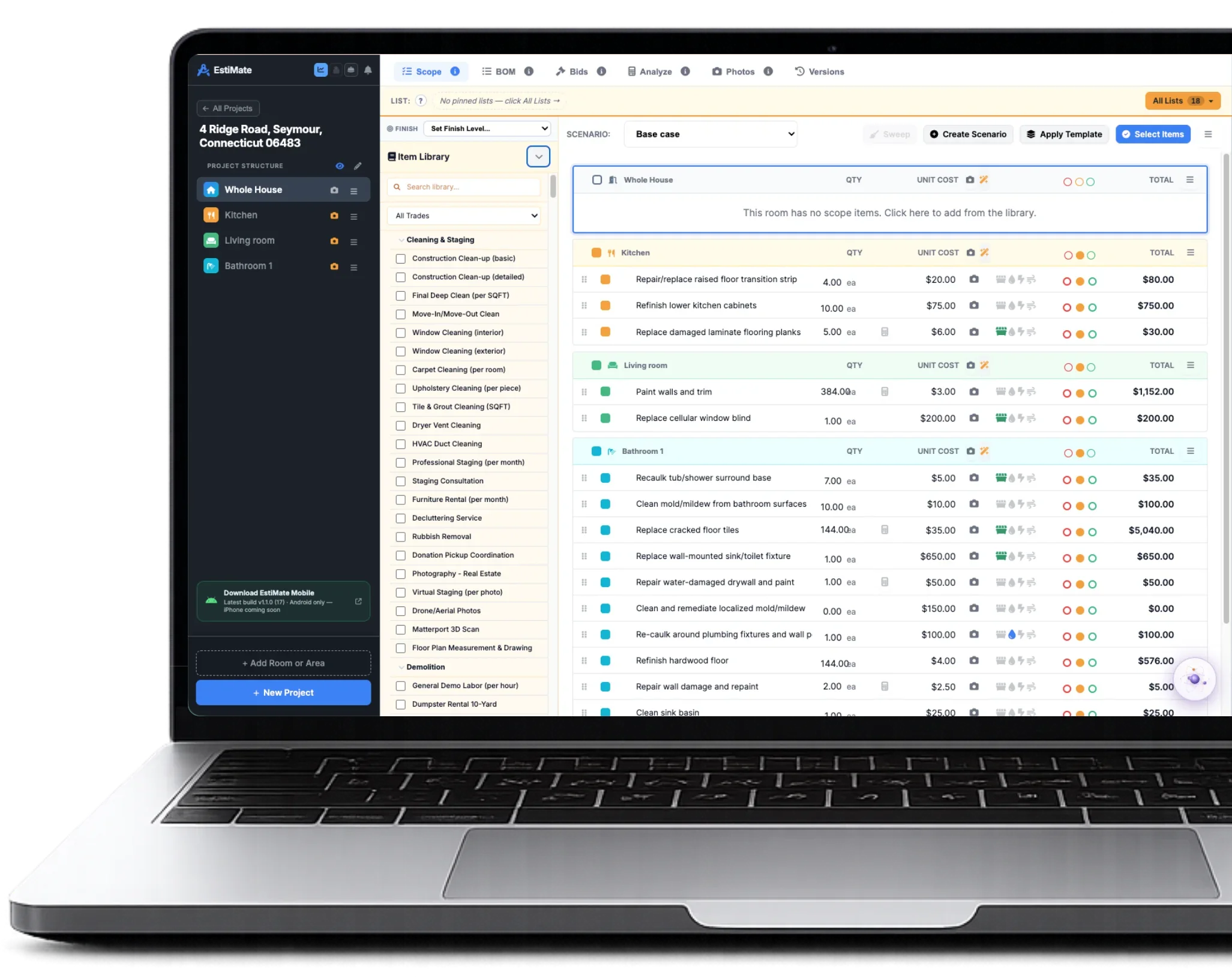
Everything the phone does, the desktop does — and the walkthrough is already open when you want it. Change a price, swap a finish level, split a room out, run the same house as a flip and as a rental and put the two side by side. And when a lender, a seller or a client questions the number, show them the line it came from.

Upload photos and the same engine runsFrom your phone, your camera roll, or dragged in from the desktop. Room detection, scope generation and measurement work identically.
Every exit strategy, off the one scopeFlip, wholesale, rental or novation — taking over the seller’s existing financing — side by side. Change a finish level and every number moves. No spreadsheet.
A lender PDF with the photo on every lineThe repair cost sits next to the picture that proves it. Your lender sees the cracked foundation beside the structural line. Nobody argues with pictures.
One scope out to your whole contractor listEach trade gets only their section, priced at their own saved rates. Compare the bids without a single phone call.
Materials list, live link and proposal, automaticallyOne scope produces every downstream document. No reformatting, no copy-paste, no switching tools.
EstiMate on a laptop: the full estimate, every line priced and editable
One room, one house, or multi-unit apartmentsMultifamily

Every unit,
scoped on its own.

Walk an apartment building and estimate all of it in one project. Every unit holds its own rooms, its own photographs and its own repair scope. Where the units match, scope one and apply that layout to the others; where they do not, price each one as you find it. Entry, laundry, hallways and the exterior are scoped separately as common areas.

9:41
Back
Build it myself

What are you scoping?

Pick the shape. You can change any of it on the next screen.

  • Single family1 kitchen · 2 baths · 3 beds
  • Duplex2 units, each with its own layout
  • Triple decker3 units stacked
  • Multi-unitUp to 10 units
  • Commercial or landStart empty, add what you find
Or reuse
  • Standard 3/2 RanchSaved layout · 8 rooms
Continue
Building, unit, roomThe project holds all three. A photograph taken in the second bathroom of 214 stays attached to that room, in that unit, in that building.
Add, name, duplicate or remove a unitUnits are yours to shape. Add one, name it, duplicate it, or take it out — the project keeps the structure straight while you do.
Scope one unit, apply it to the restWhere units do match, walk 101 once and apply that layout to all the others at once, instead of photographing the same one-bed forty-eight times.
Or copy a single unit onto anotherWhen only some of them match, copy one unit into another rather than applying the layout across the whole building.
A finish level per unitGood, Better or Best set on one unit does not touch the others, so a turnkey one-bed and a gutted three-bed can sit in the same building at different specifications.
Common areas are configured separatelyEntry, laundry, hallways and exterior are scoped outside the units — and deliberately cannot be autofilled from a unit, so hallway work is never multiplied by the unit count.
Unit totals roll up to a building totalEach unit carries its own number and the building figure is built from them, so you can quote one unit, a floor, or the whole property from the same project.
Exports carry the unit with themThe room, the unit, the item, the quantity and the cost travel together, so a spreadsheet of a forty-eight unit building is still readable.

Your price list

Your costs.
Not a guess.

You start from a catalogue that is already priced, then change the ones you buy differently. Your number wins from then on — in every room, on every job, without being asked twice.

Cabinet boxes, replace14 ea$4,620.00
Quartz countertop32 sf$2,368.00
Subfloor repair168 sf$1,142.40
This kitchen$11,021.80
Nothing forgotten

You never mentioned
the dumpster.

It is on the estimate anyway. So are the brushes, the caulk, the painter’s tape — down to the screws.

Dumpster, 20 yd1 ea$540.00
Painter’s tape, plastic, caulk1 lot$155.00
Brushes, rollers, sandpaper1 lot$86.00
Screws, nails, fasteners1 lot$64.00
Never in the quote$845.00
One scope, everyone’s pricesBoth sides of the job

Send it to ten.
Get ten quotes back.

One ecosystem, so everything in it is 100% compatible. The scope builds itself while you walk the house taking pictures. To get an accurate contractor bid, send it to any number of contractors on your list — and the contractor’s side bids it on its own, instantly, in real time, without them even knowing, at their labour rates and their real material costs. So you can move the deal, make your decisions and plan your exit strategy accurately, without delay or dependency on others. Faster offers, higher acceptance rates.

Investor scope123 Maple St
ItemQtyUnit costLogisticsTotal
Kitchen
Kitchen Demolition1 ls$1,000.00$1,045.00
Install Cabinets (LF)18.2 lf$420.00$7,644.00
Quartz Countertop42 sqft$68.00$2,856.00
Install LVP Flooring860 sqft$4.80$4,128.00
My cost estimate$41,286.50
Sent to
your contractor list
Auto-generated quoteAuto-quoted
ItemQtyMaterialLabourMarkupTotal
KitchenPriced from their own saved rates
Kitchen Demolition1 ls$0$750.0012%$840.00
Install Cabinets (LF)18.2 lf$3,900$3,20025%$8,875.00
Quartz Countertop42 sqft$2,100$63020%$3,276.00
Install LVP Flooring860 sqft$3,010$1,20418%$4,986.00
Quote ready to send$46,382.00

So you can move the deal, make your decisions and plan your exit strategy accurately, without delay or dependency on others. Faster offers, higher acceptance rates.

The product in action

Every line item. Every consumable.
Every permit. Every dumpster load.

This is the scope view. Every selection lands as a real line item — measured from your photos, priced against your catalogue, with consumables, permits and dumpsters added automatically.

123 Maple St, Austin TX  ·  3/2  ·  1,640 sqft $41,286.50
Kitchens
QTYUNIT COST LOGISTICSMATERIALLABORMARKUP ⬤◯◯ TOTAL
Kitchen Demolition 1 ls $1,000.00 $0$90915% $1,045.00
Install Cabinets (LF) 18.2 lf $420.00 $7,644.00
AI Vision Measured
FROM THIS PHOTO →Cabinet run auto-measured at 18.2 LF. Quantity set automatically. No tape measure needed.
Paint Interior (Walls, Trim, Ceiling) 1 sqft $3.50 $10$3715% $53.50
Blue Painters Tape & Plastic 1$35.00 $35.00
Auto-Added Consumable
The greyed sub-rows under each item
These consumables are added automatically — tape, drop cloths, caulk, screws. The stuff that blows real budgets.
Drywall Mud & Sandpaper 1$15.00 $15.00
Plumber's Caulk (White) 3$4.50 $13.50
Add Material / Supply
Bathroom 1
QTYUNIT COST LOGISTICSMATERIALLABORMARKUP ⬤◯◯ TOTAL
Demo Bathroom to Studs 1 ls $850.00 $0$77715% $893.00
Install Tile (Floor & Shower Surround) 68 sqft $14.50 $986.00
Photo Measured
BLUE CAMERA = PHOTO LINKEDFloor + shower surround: 68 sqft measured from your walkthrough photo automatically.
Install Vanity & Plumbing Fixtures 1 ea $1,100.00 $538$44118% $1,155.00
Finish Tiers
Good — refresh: paint, clean, cosmetic only
Better — standard remodel: mid-range finishes & fixtures
Best — full gut: premium materials, high-end spec
Each item priced per tier. Toggle the whole project instantly.
Tile Grout & Spacers 4$8.50 $34.00
Screws, Anchors & Finish Nails 1$12.00 $12.00
Add Material / Supply
Bedroom 1
QTYUNIT COST LOGISTICSMATERIALLABORMARKUP ⬤◯◯ TOTAL
Install LVP Flooring 180 sqft $4.80 $337$39518% $864.00
Paint Interior (Walls, Trim, Ceiling) 180 sqft $3.50 $121$42715% $630.00
Add Material / Supply
Exterior
QTYUNIT COST LOGISTICSMATERIALLABORMARKUP ⬤◯◯ TOTAL
Replace Roof (Asphalt Shingle) 1,640 sqft $7.80 $4,477$6,18320% $12,792.00
Debris Removal & Haul Away 2 loads $480.00 $960.00
Dumpster Auto-Calculated
AMBER = ACTIVE IN LOGISTICSTotal demo scope calculated to 2 dumpster loads. Added automatically to your budget.
Building Permit (Structural + Roofing) 1 ea $1,200.00 $1,200.00
Permit Flagged & Priced
YELLOW BOLT = PERMIT TRIGGEREDStructural + roofing scope triggered this automatically. Priced by zip code.
Roofing Nails, Underlayment Tape & Flashing 1$68.00 $68.00
Add Material / Supply
Materials$16,240
Labor$20,880
Consumables$246
Permits + Dump$3,160
Total COR$41,286.50
Real property, real time

Front door to sent offer.

No slides. No sped-up footage. One pass with the camera.

The walkthroughPlays here
EstiMatewalkthrough
What people are saying

We didn’t blindly
believe it either.

Anthony BoisticAugusta, GAwebuyhousesinaugusta.com
The dumpster got me

I never put one in or told it anything about a dumpster and then I’m going through the estimate and there it is. Same with some smaller stuff I probably wouldn’t have remembered until I was doing my numbers later. Pretty damn cool.
Bruce
I thought it was going to be another thing where they slap “AI” on normal software.

Then I actually walked a property with it.

Yeah… this is different.
Jack PinnardSummit House BuyersMerrimack Valleysummitbuyshouses.com
Was pretty skeptical about this because most AI estimating stuff I’ve tried gives you numbers I would never actually use. This lets me use my own pricing which makes a huge difference. Still check everything before I send it obviously, but I’m editing an estimate now instead of building one from nothing.
Coming from the same people of SEO For Real Estate Investors

Experts on lead generation and conversions, flipping and wholesaling.

We know what it takes to get deals done. We’ve been in the trenches, having helped over 10,000 investors and wholesalers like you.

Christian J NormanCredibility program · February 2023

$98,000 from a $3,000 ad budget

After completing the program I ran a Google Ad campaign for the month of June with a $3,000 budget. To date that ad campaign has translated to 2 assignments and 1 flip for a total profit of $98,000!!! Pretty safe to say that I have proof of concept … and am now going all in on SEO!!!
Posted on his own account
Erik WrightChattanooga, TN · June 21, 2022

$165,000 net on his first flip

I started the SEO program 2 years ago. At the time, I had a few rentals but had never bought a house off market and didn’t even know what a purchase contract looked like. … Last year I did 14 deals. This year I’m already at 15 deals closed or under contract. Last week I closed on my first ever flip. Net profit is around $165,000.
Posted on his own account
Omer Omkara ReinerFlorida · Two in one week

Two $100k+ assignments in a week

We locked up 2 wholesale deals from SEO over the past week that are more than $100k assignment fee EACH! That’s never happened to us before so close to each other. Be patient and put in the effort and you’ll see the results.
Posted on his own account
Deal mathFor investors and wholesalers

One answer.
Every screen.

Resale value from the sales nearby, minus the repairs you just scoped, minus holding and selling, minus the profit you refuse to go below. The dashboard and the analyzer read the same calculation, so they cannot disagree.

What it is worth, fixedfrom sales nearby$342,000
The repairs, from your scope48 items−$61,980
Holding, selling, your profit5 mo−$74,770
The most you can pay$205,250
One scope, four outputs

Price it once.
Send it four ways.

The same scope produces all four, from the same screen, in one click. They come off the same numbers, so none of them can contradict another in front of a client.

Bill of materials

Every material and consumable, gathered into one buying list with quantities. Hand it straight to the supplier.

Scope with the photos in it

Every repair sits beside the walkthrough photo that proves it. Lenders do not argue with pictures.

Offer as a live web page

One click and your buyer or lender opens it in a browser. No login, no download — and you are told when they read it.

Proposal they can sign

Your cover page, product photos, cost summary and terms. They sign in the browser and the deposit invoices itself.

Design StudioThe half you do not walk

Everything so far
still needs you there.

EstiMate makes the walkthrough fast. It does not make it optional — somebody still has to stand in the room with a camera. Design Studio is the half where somebody else does: a homeowner photographs their own room, picks finishes, sees it rendered, and your price list prices it. Most useful if you sell renovation work as well as buy houses — the job arrives scoped, and you never saw the property.

Design Studio: a kitchen project with finish selections, scope tiers and live pricingTry the studioDesign a kitchen and watch the price move as you do.Open the studio
Demo mode — nothing is saved.The same studio your homeowners use, running here.
  • 1Their room, as it isA homeowner photographs the space they want changed.
  • 2The finishes they wantThey choose the cabinets, the tile, the fixtures, the floor.
  • 3Rendered, not imaginedThey see the room as it would be, before anyone quotes it.
  • 4Priced from your listEstiMate prices the whole thing at your rates and sends you the lead with the scope already itemised.
It runs on your own siteDesign Studio sits on your domain, under your name. The homeowner never leaves your website to find out what the job costs.
Your prices, not a national averageThe number they see is built from the same price list your estimates use, so the quote that follows does not contradict it.
The scope arrives itemisedLine items, quantities, consumables and permits come through with the lead. You are reviewing an estimate, not starting one.
You stop quoting jobs nobody can affordThey have already seen the price and kept going. The drive out, the takeoff and the bid prep happen for people who are still there afterwards.
The speed of itFor investors and wholesalers

Be first with a number
that holds up.

While they are driving back to the office to run the numbers, you are sending the offer from the driveway.

The old way48+ hours
Walk the property

Handwritten notes, phone photos, memory.

About two hours on site
Type it all up again

Rebuild the scope in a spreadsheet from scratch.

Four to eight hours, unpaid
Chase three contractors

Call, wait for callbacks, try to compare.

One to two days of waiting
Send the offer

Days later, rebuilt from notes and memory.

Often too late
With EstiMate15 minutes to the offer
Walk the property

Photograph each room. The scope builds as you go.

Scoped before you leave
The number is already there

Totals move as you walk. Your margin is known inside.

Locked in the driveway
One scope, ten contractors

Their own rates fill it in, with no phone calls to make. Your offer never waits on them.

Bids back, often same day
Offer sent, from the driveway

Priced from what you actually saw, not from memory.

Before you drive away
Built for speed

Never build the same
estimate twice.

Every estimating tool starts you from a blank page every time. This one remembers — the rooms you always scope, the items you never buy, the rates you already set. You are correcting a draft instead of building one.

Templates

  • Save any project as a templateA whole structure — rooms, units, items, quantities — kept and reused. Your standard three-bed flip becomes a starting point, not a rebuild.
  • Save any room as a templateIf every flip gets new cabinets, counters and LVP, save that kitchen once. Every kitchen after it arrives already scoped.
  • It offers the template that fitsWhen a new project lands with empty rooms, anything matching is offered on the spot — every room and every line ticked, so accepting all of it is one click.
  • Merge or replaceApply a template into a room that already has work in it without losing what is there, or overwrite it. You choose which at the moment you apply.

Only the work you actually do

  • Hide the work you never doIf you never do pools, exclude the pool items once. They stop appearing — in search, in suggestions, in every project after.
  • A different list for flips, rentals and contract workFlipper, contractor, rental — different bodies of work off the same catalogue. Build the list once and load it.
  • Keep your most-used lists one click awayPinned lists sit on the scope bar for one-click access, so the list you use daily is never more than a click away.
  • Combine listsMerge two or more into one larger bid package rather than rebuilding the union by hand.

Set once, applies always

  • Default markup and labour ratesSaved to your account, applied to every new project and every change order without being asked again.
  • Default materialsMark the products you actually buy. They come in already selected instead of being chosen line by line.
  • One finish level, whole projectGood, Better or Best — set it once and every line re-prices to that tier.

Bulk, not line by line

  • Select many, act onceMove or delete a whole selection across rooms in one action instead of item by item.
  • Copy a unit to all of themScope one apartment, apply it to the rest of the building.
  • Clear the rooms you never scopedRooms you walked but never scoped are cleared in one pass, so nothing empty ends up in the estimate.

Change it without losing the original

  • Run it as a flip and as a rentalRun the same house as a flip and as a rental. Compare them side by side and apply the one you want, or keep both.
  • Every version keptWhat changed, and when. Try a what-if without touching the real one.
Everything it does

All of it.
No upgrade tier.

No add-on tier, no upgrade call, no quote from a sales rep.

On site

  • Finds the property from where you stand
  • Builds the room layout for you
  • Turns photos into itemised repairs
  • Repeat shots of one room stay one room
  • Works with zero signal, anywhere in the house
  • Start from a room you already saved

Your pricing

  • About a thousand items, priced and ready
  • Change any price to what you actually pay
  • Your markup and your labour rates, by trade
  • Prices adjust to the market the house is in
  • Dumpster, permits, tape and screws counted for you
  • Good, Better and Best on every line
  • A materials list you can hand to the supplier

Building the estimate

  • One house, one unit, or a whole building
  • Room by room, or the whole job at once
  • Save a room or a project as a template
  • Every version kept, with what changed
  • Try a what-if without touching the real one
  • Pin the lists you use most

The quote they see

  • Your logo, your colours, your wording
  • Sales tax, discounts and fees on the total
  • Warranty and payment terms saved once
  • They sign it in the browser, on their phone
  • The deposit invoices itself when they sign
  • You see when it was opened, and how often
  • The follow-up sends itself if they go quiet
  • Sent from your own email address

After they say yes

  • Change orders from a photo, estimate or template
  • Your own markup on the change order
  • Days added to the job, recorded on the order
  • A deadline for them to approve by
  • Invoices on approval, so it stops being free work
  • Photos, comments and full history on every one

Subs and your team

  • Send subs a bid package off the same scope
  • Compare the bids that come back
  • Post the job and get bids from other contractors
  • Invite people in, with roles
  • Comments on the project, not buried in email
  • Told when something changes

If you are buying

  • What the house is worth once it is fixed
  • The most you can pay and still make your number
  • Flip it, rent it or wholesale it
  • Cash, hard money or a normal loan
  • Compare the versions side by side
  • Where the money goes, by room and by trade
  • A cash offer, ready to send

If you are listing

  • A price opinion backed by the sales nearby
  • A listing presentation
  • A seller's net sheet that holds up at the table
  • What to fix first, and what it costs
  • Listing copy, a social post and an email, written
  • See the room finished before the work starts

Running it day to day

  • Leads, quotes out and jobs won in one list
  • Which quotes stalled, and where
  • Whether the follow-ups are actually working
  • Humphrey knows the project you have open
  • Setup that scores what you have not finished
  • A sample property to practise on
  • Seats and roles for your team

Walk the house.
Leave with the offer.

Bring one property. If the number does not hold up, you have lost twenty minutes.

Free for a week — the clock starts on your first property, not the day you sign up. Or book a call and we will walk a property with you.

Every roomScoped from photos
Every tradeAt your numbers
1 weekFree, from your first property